
Unlock the potential of your website with 7 innovative ChatGPT plugin ideas. Elevate your ranking, engage users, and boost SEO. Get started now!
ChatGPT is powerful on its own. But without plugins, it can’t browse the web, read your files, or design graphics.
Plugins unlock what ChatGPT can really do for your website, from SEO research to automated publishing.
In this post, you’ll discover the 7 must-have ChatGPT plugins (and built-in tools) to save time, rank higher, and build a better website. Let’s dive in.
What Are the 7 Must-Have ChatGPT Plugins for Website Success?
Want to build a better website faster? ChatGPT alone is smart. But ChatGPT with plugins can research competitors, analyze your traffic, design graphics, and even publish content for you.
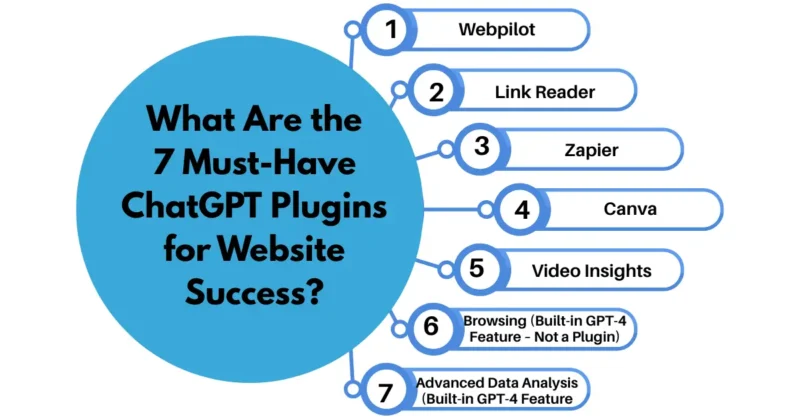
Here are the 7 must-have plugins (and built-in tools) for website success in 2026.
The 7 Must-Have Tools
1. WebPilot (Plugin)
Reads any live webpage. Paste a competitor’s URL and ask ChatGPT to summarize their content, find their keywords, or rewrite it better for your site.
Example: “Use WebPilot to read my competitor’s homepage and list their 5 main selling points.”
2. Link Reader (Plugin)
Reads PDFs, Word docs, Excel files, and images with text. Upload your website analytics or a client brief. Link Reader extracts the data so ChatGPT can analyze it.
Example: “Use Link Reader on this PDF of user feedback. Tell me the top 3 complaints about my website.”
3. Zapier (Plugin)
Connects ChatGPT to 6,000+ apps including Google Sheets, Gmail, and WordPress. Automate publishing, saving data, or sending emails without leaving the chat.
Example: “Use Zapier to save every SEO keyword from this conversation into a Google Sheet row.”
4. Canva (Plugin)
Creates and resizes designs from your chat. Need a blog header or social media graphic? Describe it, and Canva plugin makes it ready to download.
Example: “Use Canva to create a 1200×800 blog image with the title ‘7 ChatGPT Plugins for Websites’ on a blue background.”
5. Video Insights (Plugin)
Grabs any public YouTube video transcript. Find a popular tutorial in your niche, extract the steps, and turn it into a blog post or checklist.
Example: “Use Video Insights on this YouTube video about page speed optimization. Summarize the 7 action steps as a numbered list.”
6. Browsing (Built-in GPT-4 Feature – Not a Plugin)
This lives in the GPT-4 dropdown, not the plugin store. It searches live Google results and reads current web pages. Use it for real-time research.
Example: “Browse the web for the top 10 website design trends in 2026 and summarize them for my blog.”
7. Advanced Data Analysis (Built-in GPT-4 Feature – Not a Plugin)
Look for the purple icon in the GPT-4 dropdown. Upload a CSV file from Google Analytics. It writes code to analyze your traffic, find patterns, and show charts.
Example: “Upload this CSV of my last 30 days of traffic. Tell me which pages have the highest bounce rate and why.”
How to Improve Your Prompts
Use this simple formula:
Tool name + Action + Source + Output format
Weak: “Help me with keywords.”
Strong: “Use WebPilot to read my homepage at [your URL]. Extract 10 keyword ideas and output them as a table.”
Free vs. Paid
| Tool | Cost |
|---|---|
| WebPilot | Free with ChatGPT Plus |
| Link Reader | Free with ChatGPT Plus |
| Zapier | Free for 100 tasks/month |
| Canva | Free (needs free Canva account) |
| Video Insights | Free |
| Browsing | Free with ChatGPT Plus |
| Advanced Data Analysis | Free with ChatGPT Plus |
FAQs on ChatGPT Plugins
Q. What are ChatGPT plug-ins?
ChatGPT plugins are third-party tools that connect ChatGPT to external services like live web search, data analytics, SEO platforms, or design apps.
They turn ChatGPT from a text-only chatbot into an action-taking assistant that can browse the web, pull real-time data, and even update your website content automatically.
Q. What are the best plugins for ChatGPT?
The top plugins for website success include WebPilot (real-time web browsing), Link Reader (analyze any URL), SEO.app (keyword research), Zapier (connect 5,000+ apps), and Canva (design graphics).
For technical users, Code Interpreter (now Advanced Data Analysis) handles file uploads, CSV manipulation, and complex calculations.
Q. How to get plugins for ChatGPT?
You need a ChatGPT Plus subscription ($20/month), then go to Settings → Beta features → enable Plugins.
Next, open a new chat, select GPT-4, click the plugin dropdown, and visit the Plugin Store to install any plugin you want. Free tier users cannot access plugins.
Q. Are plugins free or paid?
Most plugins are free to install and use within your ChatGPT Plus subscription, but some require their own external API keys or premium accounts (e.g., SEO.app limits free searches). Always check each plugin’s pricing inside the Plugin Store before enabling—many offer generous free tiers for basic usage.
Q. What are examples of website plugins?
Real examples: WebPilot (fetch and summarize any webpage), Video Insights (analyze YouTube transcripts), Diagram It (create flowcharts from text), Speak (language translation), and Room Designer (layout planning).
For website success, focus on Browsing, SEO, and Zapier to automate content publishing.
Q. How can I improve my prompts for ChatGPT with plugins?
Be specific and structured: tell ChatGPT which plugin to use, what exact data you need, and the desired output format.
Example: *”Use WebPilot to read my competitor’s homepage at [URL], extract their top 5 keywords, then use SEO.app to suggest 10 related long-tail keywords for my blog.”* Always verify plugin outputs—they’re powerful but not perfect.
Final Thoughts on ChatGPT Plugins
Plugins won’t magically build your website overnight. But they will save you hours of manual research, copy-pasting, and repetitive tasks.
The difference between a slow website owner and a successful one? Often just knowing which tools to use — and actually using them.
Start small. Pick one plugin from this list. Test it with one real task today. Then add another tomorrow. Within a week, you’ll wonder how you ever managed without them.
Your website success isn’t about working harder. It’s about working smarter. And now, you have the tools to do exactly that.
Ready to Start?
Install these 7 tools today. Try one prompt. You’ll never copy-paste again.
Which one will you try first? Drop a comment below.
And if this helped, share it with someone who needs a faster, smarter website.
Now go build something great.
Read more articles on Digital Marketing.