

Learn how to spot and stop negative SEO attacks, from spam backlinks to hacked pages, and protect your Google rankings with these practical steps.
You can do everything right with your content and still watch your rankings drop for no clear reason.
Sometimes the cause isn’t an algorithm update. It’s someone deliberately trying to hurt your site.
This is called negative SEO: malicious tactics meant to damage a website’s search performance.
It’s less common than people fear, and Google says it’s good at ignoring most spam.
But attacks do happen, so it’s worth knowing the warning signs and setting up basic protection before you need it.
What Is Negative SEO?
Negative SEO is any deliberate attempt to lower a competitor’s rankings using unethical methods.
Instead of improving their own site, the attacker tries to make yours look bad to search engines or to break it outright.
Common Types of Negative SEO Attacks
1. Spammy backlink floods.
Attackers point thousands of low-quality or irrelevant links at your site, often with unnatural anchor text, hoping to trigger penalties or make your link profile look manipulated.
2. Content scraping.
Duplicate content issues arise when your articles are replicated and posted on other websites, often before Google has indexed your original.

3. Hacking and injected content.
If an attacker breaches your site, they can add hidden links, spam pages, or malware, or change your robots.txt or noindex settings to remove your pages from search.
4. Fake link removal requests.
Someone emails pretending to be a webmaster, asking you to remove a legitimate link. Sometimes the email contains malicious links or is a phishing attempt.
5. Fake reviews and profiles.
Attackers post fake negative reviews on Google Business Profile or review sites, or create impersonating social profiles.
6. Server overload
Heavy bot traffic can slow your site or take it offline, which hurts user experience and can affect how Google crawls it.
Warning Signs to Watch For
- A sudden drop in organic traffic or rankings, with no algorithm update to explain it
- A sharp spike in backlinks, especially from spam or foreign-language sites
- Pages disappearing from the index
- Security or manual action warnings in Google Search Console
- Unfamiliar pages, links, or redirects on your site
- Your content appearing on other domains
- Unusual server slowdowns or downtime
How to Protect Your Rankings from Negative SEO
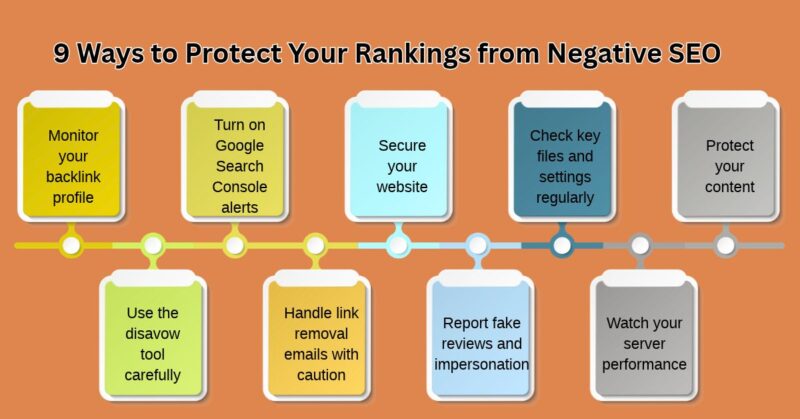
1. Monitor your backlink profile
Check the Links report in Google Search Console regularly. For deeper monitoring, tools like Ahrefs or Semrush can alert you to new links and sudden spikes.
Spotting an attack early gives you time to respond.
2. Turn on Google Search Console alerts
Search Console emails you about manual actions, security issues, and indexing problems.
Make sure the right email address is receiving them, and review the list of verified owners to confirm no one unknown has access.
3. Secure your website
Most serious negative SEO damage starts with a hacked site, so security comes first:
- Use strong, unique passwords and two-factor authentication
- Keep WordPress, themes, and plugins updated
- Use a security plugin or firewall such as Wordfence or Cloudflare
- Limit login attempts and remove unused admin accounts
- Keep regular backups you can restore quickly
4. Check key files and settings regularly
Look at your robots.txt, your noindex settings, and your redirects every so often. Attackers who gain access sometimes change these to remove your pages from search.
5. Protect your content
- Add canonical tags to your pages
- Check for copies with a tool like Copyscape or by searching a unique sentence in quotation marks
- If someone steals your content, request removal from their host or file a DMCA takedown request with Google
6. Use the disavow tool carefully
Google’s disavow tool lets you ask it to ignore specific links. Google says most sites don’t need it, and using it wrongly can hurt you.
Consider it only when you have a clear pattern of unnatural links or a manual action. If you do, create a text file listing the domains, such as domain:spamsite.com, and upload it through Search Console.
7. Handle link removal emails with caution
Don’t click links or download attachments in unexpected removal requests. Verify the sender first, and check whether the link is actually harmful before removing anything.
8. Report fake reviews and impersonation
Flag fake reviews to the platform where they appear. Report fake social profiles and impersonators through each platform’s reporting tools.
9. Watch your server performance
Use uptime monitoring and a firewall or CDN that blocks malicious bots and limits abusive traffic.

What to Do If You Think You’re Under Attack
- Confirm it’s an attack. Rule out algorithm updates, technical issues, seasonality, and normal ranking changes first.
- Check Search Console for manual actions and security issues.
- Scan your site for malware and unauthorized changes, and restore from a clean backup if needed.
- Document the evidence with screenshots, link exports, and dates.
- Disavow only when justified, as described above.
- Report and request takedowns for stolen content, fake reviews, and impersonation.
- Keep publishing good content. Strong content and legitimate links are your best long-term defense.

What I do to Protect Rankings From Negative SEO Attacks
Protect your rankings from negative SEO by monitoring your backlink profile via Ahrefs Backlink Checker and tracking errors or security messages in Google Search Console.
Rule Out Real Issues First
- Differentiate from standard drops: Most sudden traffic or ranking drops are caused by Google algorithm updates, technical glitches, or content changes rather than malicious attacks.
- Check search engine alerts: Review the Security issues tab inside Google Search Console immediately to see if Google has flagged your site as compromised.
Off-Page Protection (Spam Links & Entity Poisoning)
- Understand Google’s devaluing: Modern search engines (via Penguin algorithms) typically devalue link spam automatically rather than penalizing or demoting your entire site for incoming junk links.
- Strengthen your organic profile: Build a strong, clean base of authoritative, legitimate backlinks. Users in a Reddit SEO Consensus Discussion agree that maintaining a high ratio of healthy links helps dilute potential spam attempts.
- Use the disavow tool sparingly: Google explicitly states that most sites do not need to use the disavow tool unless you have built or paid for spammy links yourself in the past.
On-Page & Technical Security
- Harden website security: Keep your CMS (such as WordPress), themes, and plugins strictly updated. Implement a web application firewall (WAF) and reliable security plugins.
- Enforce HTTPS: Migrate your entire domain to HTTPS with a valid SSL certificate to protect data and prevent connection exploits.
- Regular backups: Maintain automated, off-site backups so you can quickly restore your database and clean out any injected malicious files if an intrusion occurs.
Reputation & Content Defense
- Handle copied or scraped content: If competitors duplicate your original content across the web, reach out to site owners to request removal, or submit a takedown request via the Google Digital Millennium Copyright Act Tool.
- Respond professionally to review bombing: If you face coordinated fake one-star reviews, reply constructively or flag abusive reviews to platform moderators instead of retaliating.
Monitor Your Backlink Profile
- Track New Links: Use backlink monitoring tools or alerts from Google Search Console or platforms like MonitorBacklinks to catch sudden spikes in low-quality or spammy links early.
- Understand Google’s Stance: According to Google, most websites do not need to use the disavow tool because Google’s algorithms automatically ignore most random link spam.
- Use the Disavow Tool Selectively: If you identify a massive, coordinated toxic link campaign genuinely harming your metrics, use the Google Disavow Tool to tell Google not to factor those specific URLs into your rankings.
- Strengthen Your Profile: Cultivate a strong, organic backlink profile over time so that manipulative external tactics have a minimal impact.
As noted by community consensus on Reddit, maintaining a high ratio of legitimate, earned links helps dilute the effect of spam links.
Harden Website Security
- Keep Software Updated: Regularly update your CMS (such as WordPress), themes, and plugins to patch vulnerabilities that attackers could exploit to inject malware or spam links.
- Enforce Strong Credentials: Use complex passwords, enable two-factor authentication (2FA), and change default login URLs.
- Install a Firewall: Set up a Web Application Firewall (WAF) and security plugins like Wordfence to block malicious requests and break-in attempts.
- Maintain Regular Backups: Store automated, off-site backups of your website so you can quickly restore clean code if a security breach or defacement occurs.
Guard Against Content Theft and Impersonation
- Detect Copied Content: Run routine checks using tools like Copyscape to see if competitors or attackers are scraping and republishing your original content elsewhere.
- File DMCA Takedowns: If you find your original content duplicated across the web, contact the site owner first, or submit a formal takedown request using the Google DMCA Takedown Tool.
- Monitor Brand Mentions: Track your brand name across social media and web pages using alert tools like Mention to spot entity poisoning or fake review campaigns.
FAQs on Protecting Rankings From Negative SEO
Q. What are featured snippets in Google Search?
Featured snippets are selected answers from webpages that Google displays prominently in search results to answer users’ questions. They can appear as paragraphs, numbered lists, bullet points, tables, or video results.
Q. How do I optimize my blog post for featured snippets?
To optimize your blog post, identify question-based keywords, provide direct answers under relevant headings, use clear paragraphs, organize information into lists or tables, and make sure your content is accurate and helpful.
Google automatically selects featured snippets, so placement is never guaranteed.
Q. Do featured snippets improve SEO rankings and organic traffic?
Featured snippets can increase your website’s visibility and brand recognition. They may attract additional organic visitors, but they do not guarantee higher overall rankings or more clicks.
Results depend on the search query and how useful the displayed answer is to users.
Q. What is the ideal word count for a featured snippet?
There is no officially recommended word count for featured snippets. Focus on answering the search query clearly and completely. Keep definitions concise, use short paragraphs, and provide additional explanations when necessary.
Q. Can a new website get featured snippets on Google?
Yes. New websites can potentially earn featured snippets if their content provides relevant, accurate, and helpful answers.
Focus on specific long-tail keywords, understand search intent, and create well-organized content instead of competing immediately for highly competitive keywords.
Q. Does FAQ schema help content appear in featured snippets?
No. FAQ schema does not guarantee featured snippet placement. Google automatically selects featured snippets based on its understanding of webpage content.
You should use structured data only when it accurately represents eligible content and follows Google’s guidelines.
Final Thoughts
Negative SEO is less common than the fear around it suggests, and Google ignores most spam links on its own.
But the cost of being unprepared is high, so the best defense is simple habits: monitor your links, secure your site, keep backups, and respond calmly to real problems.
Ready to boost your website’s visibility on Google? Start optimizing your blog posts for featured snippets today!
Read articles about Digital Marketing.